Re-blog: C# Version History: Examining the Language Past and Present

Please note I am not the author of this blog post, it is a re-blog, please visit original article at https://blog.ndepend.com/c-versions-look-language-history/

I still remember my first look at C# in the early 2000s.  Microsoft had released the first major version of the language.  I recall thinking that it was Java, except that Microsoft made it, called it something else, and put it into Visual Studio.  And I wasn’t alone in this sentiment.  In an old interview, Java inventor James Gosling called it an imitation.  “It’s sort of Java with reliability, productivity, and security deleted,” he said.  Ouch.

A lot changes in 15 years or so.  I doubt anyone would offer a similar assessment today.  In that time, Java has released four major language versions, while C# has released six.  The languages have charted divergent courses, and C# has seen a great deal of innovation.  Today, I’d like to take a look back on the history of C# and highlight some of those key points.

What did the language look like in its earliest incarnations?  And how has it evolved in the years since?

C# Version 1

When you go back and look, C# version 1 really did look an awful lot like Java.  As part of its stated design goals for ECMA, it sought to be a “simple, modern, general purpose object-oriented language.”  At the time, it could have done worse thank looking like Java in order to achieve those goals.

But if you looked back on C# 1.0 now, you’d find yourself a little dizzy.  It lacked the built in async capabilities and some of the slick functionality around generics that we take for granted.  As a matter of fact, it lacked generics altogether.  And Linq?  Nope.  That would take some years to come out.

C# version 1 looked pretty stripped of features, compared to today.  You’d find yourself writing some verbose code.  But yet, you have to start somewhere.

C# Version 2

Now things start to get interesting.  Let’s take a look at some major features of C# 2.0, released in 2005, along with Visual Studio 2005.  (Check out the book by NDepend creator Patrick Smacchia about .NET 2.0.)

While Microsoft may have started with a pretty generic object-oriented language, C# Version 2 changed that in a hurry.  Once they had their feet under them, they went after some serious developer pain points.  And they went after them in a big way.

With generics, you have types and methods that can operate on an arbitrary type while still retaining type safety.  So, for instance, having a List<T> lets you have List<string> or List<int>  and perform type safe operations on those strings or ints while you iterate through them.  This certainly beats creating ListInt inheritors or casting from Object for every operation.

Oh, and speaking of iterators, C# Version 2 brought iterators.  To put it succinctly, this let you iterate through the items in List (or other Enumerable types) with a foreach loop.  Having this as a first class part of the language dramatically enhanced readability of the language and people’s ability to reason about the code.

And yet, Microsoft continued to play a bit of catch up with Java.  Java had already released versions that included generics and iterators.  But that would soon change as the languages continued to evolve apart.

C# Version 3

C# Version 3 came in late 2007, along with Visual Studio 2008, though the full boat of language features would actually come with C# Version 3.5.  And what a version this proved to be.  I would go so far as to say that this established C# as a truly formidable programming language.  Let’s take a look at some major features in this version.

In retrospect, many of these features seem both inevitable and inseparable.  In fact, I have a hard time a true headliner, since they all fit together so strategically.  Others won’t have that same problem, though.  They’ll say that C# Version 3’s killer feature was the query expression, also known as Linq (Language INtegrated Query).

I chase a little more nuance because I view expression tress, lamba expressions and anonymous types as the foundation upon which they constructed Linq.  But, in either case, we found ourselves presented with a fairly revolutionary concept.  Microsoft had begun to lay the groundwork for turning C# into a hybrid OO-functional language.

Specifically, you could now write SQL-style, declarative queries to perform operations on collections, among other things.  Instead of writing a for loop to compute the average of a list of integers, you could now do that as simply as list.Average().  The combination of query expressions and extension methods made it look as though that list of ints had gotten a whole lot smarter.

It took a little while for people to really grasp and integrate the concept, but they gradually did.  And now, years later, code is much more concise, simple, and functional.

C# Version 4

C# Version 4 would have had a difficult time living up to the groundbreaking status of version 3.  With version 3, Microsoft had moved the language firmly out from the shadow of Java and into prominence.  The language was quickly becoming elegant.

The next version did introduce some cool stuff, though.

Embedded interop types alleviated a deployment pain.  Generic covariance and contravariance give you a lot of power, but they’re a bit academic and probably most appreciated by framework and library authors.  Named and optional parameters let you eliminate a lot of method overloads and provide convenience.  But none of those are exactly paradigm altering.

I’ll leave that distinction for the introduction of the dynamic keyword.  By doing this, Microsoft introduced into C# Version 4 the ability to override the compiler on compile time typing.  That’s right.  By using the dynamic keyword, you can now shoot yourself in the foot a la dynamically typed languages like JavaScript.  You can create a dynamic x = “a string” and then add six to it, leaving it up to the runtime to sort out what on earth should happen next.

I say that a bit tongue in cheek, obviously.  This gives you the potential for errors but also great power within the language.

C# Version 5

With C# Version 5, Microsoft released a very focused version of the language.  They put nearly all of their effort for that version into another pretty groundbreaking language concept.  Here is the major features list.

Now, don’t get me wrong.  The caller info attribute is pretty cool.  It lets you easily retrieve information about the context in which you’re running without resorting to a ton of boilerplate reflection code.  I actually love this feature.

But async and await are the real stars of this release.  When this came out in 2012, Microsoft changed the game again by baking asynchrony into the language as a first class participant.  If you’ve ever dealt with long running operations and the implementation of webs of callbacks, you probably loved this language feature.

C# Version 6

With versions 3 and 5, Microsoft had done some pretty impressive stuff in an OO language.  (Version 2 did as well, but they were fast following Java with those language features.)  With version 6, they would go away from doing a dominant killer feature and instead release a lot of features that delighted users of the language.  Here are some of them.

Taken individually, these are all cool language features.  But if you look at them altogether, you see an interesting pattern.  In this version, Microsoft worked really hard to eliminate language boilerplate and make code more terse and readable.  So for fans of clean, simple code, this language version was a huge win.

Oh, and they did do one other thing along with this version, though it’s not a traditional language feature, per se.  They released Roslyn the compiler as a service.  Microsoft now uses C# to build C#, and they let you use the compiler as part of your programming efforts.

C# Version 7

Finally, we arrive at C# version 7.  That’s the current version as of the writing of this post.  This has some evolutionary and cool stuff in the vein of C# 6, but without the compiler as a service.  Here are some of the new features.

All of these offer cool new capabilities for developers and the opportunity to write even cleaner code than ever.  In particular, I think Microsoft scratched some long term itches by condensing the declaration of variables to use with the “out” keyword and by allowing multiple return values via tuple.

But Microsoft is also busy putting the language to ever broader use.  .NET now targets any operating system and has its eyes firmly on the cloud and on portability.  This certainly occupies the language designers’ thoughts and time, in addition to coming up with new features.

I’ve been familiar with C# for just under 15 years now, and the language has been under development for even longer than that.  It’ll be exciting to see what features and capabilities the future brings.

Pi – The Personal Assistant – Speech Recognition (Raspberry Pi + IBM® Watson)

Not as nice as having AI run independently on a Pi (like the Microsoft example shared yesterday), but this is another example of ML being used on a Pi…

… this example for Speech recognition requires Watson cloud services and subscription, but thought I would share in case anyone is interested.

Pi – The Personal Assistant – Speech Recognition (Raspberry Pi + IBM® Watson) – Prototype for a voice enabled personal assistant built on Raspberry Pi using IBM Watson services
Learn how to build your own voice enabled Personal Assistant that listens, understands & responds with your Raspberry Pi
https://developer.ibm.com/recipes/tutorials/pi-the-personal-assistant-raspberry-pi-ibm-watson/

… same would be just as easily achieved using Cortana (https://developer.microsoft.com/en-us/Cortana) or Google (https://cloud.google.com/speech/).

Microsoft made its AI work on a $10 Raspberry Pi

dims

When you’re far from a cell tower and need to figure out if that bluebird is Sialia sialis or Sialia mexicana, no cloud server is going to help you. That’s why companies are squeezing AI onto portable devices, and Microsoft has just taken that to a new extreme by putting deep learning algorithms onto a Raspberry Pi…

…The idea came about from Microsoft Labs teams in Redmond and Bangalore, India. Ofer Dekel, who manages an AI optimization group at the Redmond Lab, was trying to figure out a way to stop squirrels from eating flower bulbs and seeds from his bird feeder. As one does, he trained a computer vision system to spot squirrels, and installed the code on a $35 Raspberry Pi 3. Now, it triggers the sprinkler system whenever the rodents pop up, chasing them away.”


https://www.engadget.com/2017/06/30/microsoft-made-its-ai-work-on-a-10-raspberry-pi/


White Paper On “Planning A Power BI Enterprise Deployment”

Chris Webb's avatarChris Webb's BI Blog

I’m pleased to announce that a white paper I co-authored with Melissa Coates on “Planning a Power BI enterprise deployment” has now been published. You can download it from the Power BI white papers site here: https://aka.ms/pbienterprisedeploy

Melissa has already blogged about the white paper here.

Topics covered include the different ways that Power BI can be deployed (as a self-service BI tool or as a corporate BI tool); licensing; preparing data for use in Power BI; choosing a data storage mode (import vs Live connections to SSAS vs DirectQuery); data refresh and the on-premises gateway; best practices for report development; collaboration and sharing (covering apps and content packs); options for consuming reports and data published to Power BI; and security, compliance and administration. If that sounds like a lot, it is: it’s 105 pages long!

It was a real pleasure working with Melissa on this, and I’d also…

View original post 31 more words

Thoughts On All The Recent Power BI/SQL Server 2016 BI/Excel 2016 News

Nice summary…

Chris Webb's avatarChris Webb's BI Blog

The last few weeks have seen more Microsoft BI-related announcements in a short time than I can ever remember before. Some of them I’ve blogged about; most I’ve at least tweeted. For good summaries of what’s coming for Power BI, on-premises SQL Server BI and Excel 2016 I can recommend the following posts by other people, all of which are worth reading:

http://www.jenunderwood.com/2015/05/14/sql-server-bi-2016/

http://www.jenunderwood.com/2015/04/23/april-microsoft-bi-world-news/

http://byobi.com/blog/2015/05/ssas-related-enhancements-in-sql-server-2016/

https://gqbi.wordpress.com/2015/05/14/bi-nsight-excel-2016-power-bi-updates-including-new-data-sources-azure-sql-data-warehouse/

https://gqbi.wordpress.com/2015/05/07/bi-nsight-sql-server-2016-power-bi-updates-microsoft-azure-stack/

Even then I’m not sure everything has been covered, and because new stuff is coming thick and fast (custom regions in Power Map! DirectQuery/ROLAP in the cloud with Power BI connecting to Azure SQL Database!) it’s hardly worth trying. However, I do think this is as good a point as any to work out what I think about all this activity and where Microsoft is heading.

SSAS Multidimensional Improvements

I’m well past the stage of feeling angry about the…

View original post 1,664 more words

Power BI And Excel 2016 BI News

Chris Webb's avatarChris Webb's BI Blog

There have been quite a few Power BI and Office BI-related announcements over the last few weeks, and while I’ve tweeted about them (I’m @Technitrain if you’re not following me already) I though it would be a good idea to summarise them all in one post.

Power BI Announcements at Convergence and SQLBits

You’ve probably already seen the announcement today on the Power BI blog that Power BI is FINALLY available to those of us outside the USA:

http://blogs.msdn.com/b/powerbi/archive/2015/03/16/power-bi-preview-now-available-worldwide.aspx

At last! I’m sure MS had very good reasons why they couldn’t make the Power BI Preview available worldwide back in December, but this decision caused a lot of frustration in the MS BI community and I hope it’s not something that happens again. I can also confirm that the Power BI iPhone app is now available in the UK as well. The new data sources for Power BI that are…

View original post 376 more words

Getting Cortana if it is not visible or blocked for your region on Windows Phone 8.1

wp_ss_20141220_0008You can still get Cortana, even if your carrier has block/not rolled it out, provided you can do the manual updates.

Worth noting that some carriers will intentionally block the update for a while with phones already out there based on your regional settings, this is so they can sell the new ones with it enabled as a selling point. Hence the 630 got it before you could update the 920… but as I mention you can still get it, provided you can upgrade your phone to 8.1 and relatively recent updates, newer the updates the newer the version you will get and the more “languages and accents will be supported”.

Also worth knowing – you might already have it if you are the latest update, it might be that it is just not switched on, default is “off”… On most older phones, including 920, it is still classed as a “Beta” application which replaces the existing speech support built into those devices since 8.0…

Finding it if you already have it: –

wp_ss_20141220_0001wp_ss_20141220_0002open “Settings”

  • you will be on the default tab “system”, swipe to the side so you are on “applications”, if it is available with your current configuration, it will be listed. 
  • Click “Cortana”.
  • Turn it on.
  • Restart the phone if required.
  • Hold down search button to start it.

If blocked or not visible – getting it if you do not have it: –

This varies somewhat depending on your device and update availability… easiest thing to do is change everything to “English (United States)” turn on Cortana and then try adjusting things back to your region one by one… when Cortana stops working change whatever you last changed back to “English (United States)”

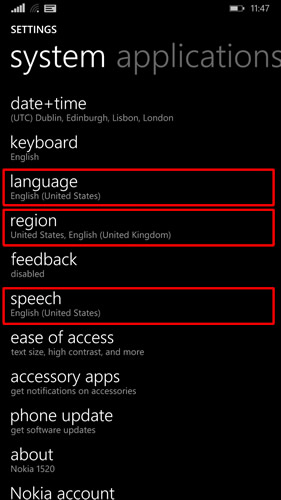
The three areas to change are “Region”, “Language” and “Speech”. Then you need to turn it on.

Cortana will only work if “Language” and “Speech” match and Cortana is available for that combination.

System Settings   System Settings

Here I have it working with both English UK and US note that “Language” matches “Speech”

open “Settings” 

  1. Region SettingsUnder the default tab “system” scroll down and go into “Region”.
  2. Change “country/region” to “United States” (if Cortana not available to you).
  3. Change “Regional format” to <your desired format> (for me “English (United Kingdom)”).  
    • This preserves your currency and date format.
  4. Click on “Restart Phone”.
  5. Check for any updates, and install them, restart as required.
    • This will get Cortana and other updates if not already installed.
       
  6. Language SettingsUnder the default tab “system” scroll down and go into “Language”.
  7. Change the language to match the region setting (“English (United States)”).
  8. Click on “Restart Phone”.
  9. Next bit differs depending on whether Cortana is available in your local language version… including the variations in English accent and pronunciation.
    • If it is, available in your language/accent.
      1. from within “Settings”.
      2. System Applicationsif on “system” tab, swipe to the side so you are on “applications”
      3. if available you will see Cortana at or near the top.
    • If it is not visible within “applications” tab (within “Settings”)
      1. Go back to the “system” tab.
      2. Scroll down to to “speech”.
      3. Go into “speech” and change the “Speech language” to “English (United States)” … or another one that is currently supported by cortana…

        System SettingsSystem SettingsNote: Depending on your current phone setup, you may need to download, then go back into this and reselect it to get it to install, follow the prompts, reboot as required and then check for any phone updates, which will get the updated speech package which includes cortana.
      4. Make sure “speech” matches “language”.
      5. System Application SettingsCortana SettingsOnce done with all the updates/install of language packs, as above, go into settings, swipe to side to get “applications” tab… and you will see Cortana listed… open it and switch it on.
      6. Restart phone if required, hold down search button an say hello to Cortana.

Finding the columns and values from AggregateResult (or QueryResult/sObject) in Salesforce.com APEX

I have been doing some quite intensive Saleforce.com (Visualforce.com) custom site development recently. This has involved full front to back-end development on multiple levels along with integration into various jQuery and charting frameworks.

One issue I ran into I could find no immediate recommended solutions in the various forums. This was having the ability to iterate through a result set, determine the column names and values.

While retrieving the data was relatively simple through SOQL, after employing the various workarounds for the lack of ability to do simple joins. Once I had my query I needed to consume it dynamically from multiple sources (different AggregateResult sets).

In order to make the application robust the consumption of the AggregateResult set needed to be dynamic, and be able to adapt to varying data that might be supplied to it i.e. for the chart output we would have some standard fields, but there would be additional fields the number of which would vary depending on the result set.

In most development languages there is some object model to verify that a column exists and if it does get your value out of it. AggregateResult is the same if you are using C#, the result set is XML so you can confirm structure, but within APEX there is currently no ability to do that.

At first I though I could use “<my agg res>.getSObjectType().getDescribe().fields.getMap()”, but I soon found that only returned one field, an internal ID field, unrelated to my data.

After searching for a quick solution, nothing obvious could be found, so had to figures something else out.

I did try to serialize the result set but that failed as well. Apparently sObjects cannot be serialized (within APEX), which I found odd.

While trying to debug and figure out a solution, I stumbled onto the fact that the AggregateResult object would convert to a string… that led me to the solution.

The string (at least for now) follows a predictable format:

string somethingToWorkWith = string.valueOf(myAggregateResult);

Will give me a string which has the format:

AggregateResult:{MyColumn1=Value1, MyColumn2=Value2}

This allows me to pull out all of my data, with their types intact. Below are a couple of functions, one will get me all my columns in a set, the other will get me all my columns and values in a key/value map. Note that in order to preserve the original type (class) of data the later function’s value is a generic object, and it is pulled from the original AggregateResult, rather than from the converted string array.

/**
* Returns set of columns in the supplied AggregateResult.
**/
public static Set<string> AggResColumns(AggregateResult a) {
    if (a == null) return new Set<string>();
        set<string> myColumns = new set<string>();
        string ar = string.valueOf(a).removeStart(‘AggregateResult:’).removeStart(‘{‘).removeEnd(‘}’);
        string[] ars = ar.split(‘, ‘, 0);
        for (string pair :ars) {
            if (pair != null && pair != && pair.indexOf(‘=’) > 0) {
            string[] keyAndValue = pair.split(‘=’, -2); //We are using -2 deliberately.
           if (keyAndValue.size() > 0 && keyAndValue[0] != null && keyAndValue[0] != ) {
                myColumns.add(keyAndValue[0]);
            }
        }
    }

    return myColumns;
}

/**
* Returns map of columns and values in the supplied AggregateResult.
**/
public static map<string, object> AggResColumnsAndValues(AggregateResult a) {
map<string, object> myValues = new map<string, object>();
string ar = string.valueOf(a).removeStart(‘AggregateResult:’).removeStart(‘{‘).removeEnd(‘}’);
   
string[] ars = ar.split(‘, ‘, 0);
   
for (string pair :ars) {
       
if (pair != null && pair != && pair.indexOf(‘=’) > 0) {
           
string[] keyAndValue = pair.split(‘=’, -2); //We are using -2 deliberately.
           
if (keyAndValue.size() > 0 && keyAndValue[0] != null && keyAndValue[0] != ) {
               
myValues.put(keyAndValue[0], a.get(keyAndValue[0]));
           
}
        }
    }

    return myValues;
}

Self Service BI within Manufacturing #SQLSaturdayEdinburgh #SQLPASS Presentation (#SQLSat)

SQL Saturday

Edinburgh First Conference CentreDuring mid April I was approached by Microsoft (UK) and asked if I would do a presentation at the Microsoft “Accelerate Your Insights” one day conference on the 1st of May 2014. Though hesitant and somewhat nervous about the prospect, as I had never spoken in public… I agreed and prepared a presentation.

The presentation was related to the recent Case Study I had the pleasure of being involved in through my employer, Jabil (@JabilCircuitInc). It would focus on how, at Jabil, we have progressed though the various backend SQL Server infrastructures offered by Microsoft over recent years and how we are using new technologies and features to enable BI delivery to our employees via production systems.

As a direct result of the presentation at Microsoft’s UK headquarters (Reading, UK) I was also invited to speak at a SQL Saturday (SQL PASS community event) being held in Edinburgh on 14th June 2014 at Edinburgh University Conference Centre.

Though hitting a bit of a technical snag with my work laptop, with less than 2 minutes to my presentation: –

Image

I quickly switched to my personal Surface Pro, which by pure chance I had decided to grab as I was leaving in the morning… had only took it so I had something light to play with between session. Just as well I did – quick switch, download of presentation from cloud storage and was good to go minus my demos.

Overall was able to buffer out the presentation, taking about several other aspects and areas we are working with SQL 2014 and BI… had several questions so am taking from that that audience engagement was good. Hopefully all that attended my presentation took away something that they did not know or at least found it useful.

Presentation can be downloaded both the SQL Saturday website and from here: –

Image

Thanks to Jen Stirrup (@JenStirrup) for the invitation to speak and arranging the great free training event; hope to be invited back in the future.

#SQLPASS #SQLSat #SQLSatEdinburgh #SQLSat281

Full case study @ http://www.microsoft.com/casestudies/Case_Study_Detail.aspx?CaseStudyID=710000004223

Global Firm Takes an Evolutionary Leap in Data Management with Self-Service BI (Case Study)

A case study I was involved in just got published on Microsoft.com.

Over the past few years a lot of the work I have been involved in has been subject to NDAs, including this work with Microsoft (via my employer). Hence been unable to blog about my work or any of the great features of SQL Server 2014 or the Power BI suite of products.

Over the past year as part of the case study we were given advance access to SQL Server 2014 builds, Power BI and enhanced features of SharePoint. We also had assistance and regular contact with the SQL development team and Power BI guys.

As direct result of my participation I was lucky enough to enjoy a few trips to the USA, including to Seattle, Charlotte (for SQL PASS 2013 conference) and Tampa; making 2013 a very enjoyable and educational year for me 🙂 

Business intelligence (BI) information is only valuable when the right users can discover, analyze, use and share it with others—and all in a timely manner. Current technologies produce data at overwhelming rates, often faster than business users can analyze it, and the bottleneck is frequently the time that it takes to generate useful and impactful reports. At US-based supply chain management giant Jabil, as in many enterprises, data analysis has long been a time-consuming and intensive collaboration between the business groups and IT, creating customized reports whose information, by the time it’s used, is already growing stale. With its new solution built on Microsoft SQL Server 2014 and SQL Server 2014 Power View, Jabil users can create their own reports in minutes from business critical data sources using Microsoft Excel, with IT providing training and guidance—freeing up time to work on strategic projects.

Full case study @ http://www.microsoft.com/casestudies/Case_Study_Detail.aspx?CaseStudyID=710000004223

Download PDF of Case Study