Application Lifecycle Management (ALM) – Visual Studio 2012 Update 1

For anyone who has missed it and would like play, or would like the updated version the Application Lifecycle Management (ALM) Virtual Machine and Hands-on-Labs from the ALM team at Microsoft, who originally published the VM at the tail end of 2011 for VS 2010. They have updated it to Visual Studio 2012 Update 1 in Dec 2012…

Free download, and well worth looking at… really need to find more time myself to have a dig into this one 🙂

NOTE: you need access to Hyper-V to use this VM, it is x64 and a Hyper-V image so will not run under Microsoft Virtual Machine, as that is x86 only; will probably run under VM Virtualbox or others that support x64. See the ALM blog for full details…

http://blogs.msdn.com/b/briankel/archive/2011/09/16/visual-studio-11-application-lifecycle-management-virtual-machine-and-hands-on-labs-demo-scripts.aspx

Hands On LabsThis virtual machine and corresponding hands-on-labs / demo scripts have been upgraded to use Visual Studio 2012 Update 1. One new lab was added, focusing on diagnosing and testing SharePoint 2010 applications with the new ALM tools available in Visual Studio 2012 Update 1. All other labs were revised slightly based on Update 1, with two labs gaining new exercises which demonstrate Update 1 capabilities. New and updated labs are listed in the table below

New features in Visual Studio 2012:

  • Agile Project Management in Visual Studio Team Foundation Server 2012
  • Building the Right Software – Generating Storyboards and Collecting Stakeholder Feedback with Visual Studio 2012
  • Diagnosing Issues in Production with IntelliTrace and Visual Studio 2012
  • Unit Testing, Code Coverage, and Code Clone Analysis with Visual Studio 2012 UPDATED for Update 1
  • Making Developers More Productive with Visual Studio Team Foundation Server 2012
  • Exploratory Testing and Other Enhancements in Microsoft Test Manager 2012
  • Introduction to PreEmptive Analytics
  • Lab Management Improvements in Visual Studio 2012
  • Testing and Debugging SharePoint 2010 Applications with Visual Studio 2012 NEW for Update 1
  
Labs upgraded from Visual Studio 2010:
  • Authoring and Running Manual Tests using Microsoft Test Manager 2012
  • Introduction to Test Planning with Microsoft Test Manager 2012
  • Introduction to Test Case Management with Microsoft Test Manager 2012
  • Introduction to Platform Testing with Microsoft Test Manager 2012
  • Introduction to Coded UI Tests with Visual Studio Ultimate 2012
  • Branching and Merging Visualization with Visual Studio Team Foundation Server 2012
  • Debugging with IntelliTrace using Visual Studio Ultimate 2012
  • Using Code Analysis with Visual Studio 2012 to Improve Code Quality
  • Understanding Class Coupling with Visual Studio Ultimate 2012
  • Code Discovery using the Architecture Tools in Visual Studio Ultimate 2012 UPDATED for Update 1
  • Using the Architecture Explorer in Visual Studio Ultimate 2012 to Analyze Your Code
  • Introduction to Web Performance and Load Testing with Visual Studio Ultimate 2012

Trying to install McAfee 8.7i onto a Windows 8 box?

This is probably unsupported since McAfee web site states McAfee 9 is required, but got it working…

If Windows 8 (because McAfee 8.7 is not “friends” with Windows 8) do following (note that Framepgk45 is for Enterprise EPO install, if you have/need to install it; then do it before main McAfee install as below)

  1. Turn of Windows Defender (press start button, then type defender, open it, then goto last tab, then untick on-access scan, click save, then click administration – bottom of menu on left, disable defender, click save).
  2. Open services and change Windows Defender service from manual to disabled.
  3. Turn of UAC (press start button, type uac, open it, then move bar to lowest setting).
  4. Turn of DEP (run command prompt as admin and execute “bcdedit /set {current} nx AlwaysOff” (without quotes)).
  5. Restart device.
     
    Then: – 
  6. Change Framepgk45, setupvse.exe and Antispyware installers to run as if previous version of windows (all in different folders).
  7. [OPTIONAL if Enterprise] Run Framepgk45 and reboot.
  8. Run setupvse.exe at end choose “run update” and DESLECT “scan” once done reboot.
  9. Run Antispyware and reboot.

Else if not Windows 8 just

  1. [OPTIONAL if Enterprise] Run Framepgk45.
  2. setupvse.exe
  3. run update not scan 
  4. Antispyware

Microsoft Office – Exploring the New JavaScript API for Office

Interesting stuff…

“This article is the first in a series of in-depth looks at the JavaScript API for Office, newly introduced in Microsoft Office 2013. It presupposes that you’re familiar with apps for Office. If not…”

http://msdn.microsoft.com/en-us/magazine/jj891051.aspx

Visual Studio 2012 Update 2 CTP

Some nice ALM goodies coming up in the Visual Studio 2012 Update 2 – the “HTML and JavaScript Visual Profiler” looks good – the February CTP is available now for those interested in an advance peek.

Image

http://blogs.msdn.com/b/visualstudioalm/archive/2013/02/11/february-ctp-for-visual-studio-update-2.aspx

Issue installing Android SDK onto Windows 8

Hi… been a long time since I posted, work, life, … etc… interfering…

Thought I would share a qickie…

Unable to install Android SDK onto Windows 8 despite having already installed Java? Ok quick fix, no idea why, ask someone else, but rename c:\windows\system\java.exe or c:\windows\system32\java.exe or c:\windows\syswow64\java.exe depending on install to java.exe.orj" then run the Android installer (4.*) again should install ok onto Windows 8 🙂

It will pick up the Java executable from your program files instead and will install OK…

Remember to install Java 7.* first before installing current Android SDK!

Paul

LINQ to SQL and Entity Framework… issues I have encountered with EF.

For the past 6 months or so there has been various discussions raised on the LINQ to SQL (released with .NET 3.5) vs. Entity Framework (released with .NET 3.5 SP1). Including several blog posts claiming that LINQ to SQL is dead (here, here and here are a few of them) and that LINQ to SQL is to be replaced by EF; these blogs were a result of an ADO.NET team blog post.

This is probably in part to do with the fact that LINQ to SQL was written by the C# development team, and EF is developed by the ADO.NET team, and they were both developed in parallel.

The ADO.NET team started development of the Entity Framework in 2003; at around the same time the C# design group embarked on developing a LINQ to SQL extension as a “stand-in” for the abandoned ObjectSpaces O/RM tool. I have read that LINQ to SQL was mainly written to help aid the development of LINQ in particular for the AND/OR query clauses.

Apparently the two projects were developed with little communication between the teams and in 2006 the ADO.NET team gained ownership of the LINQ to SQL and LINQ to DataSet implementations, adding LINQ to Entities into the mix.

The Entity Framework was originally meant to be included in .NET 3.5, however it was removed from early betas. It was later included in .NET 3.5 SP1. LINQ to SQL was originally developed to work with other databases, but prior to it’s release (for non-technical reasons) it was restricted to work with MS SQL Server only.

Having been playing with LINQ to SQL for a bit I found it very easy to implement and program against. Pretty much just dragging my tables into a DBML and by customising the MySettings class it allowed me to use the same connection settings as previous datasets and non-.NET apps. It made it very easy to integrate some LINQ to SQL with existing application development.

The database I am currently developing with has 364 tables (with around 850 FK links between them). Though dropping all of these onto a LINQ to SQL DBML file takes a while for Visual Studio to process, it works. Customising the DBML would be a bit of a pain however, given the lack of update facility in the designer (though there is a tool I am looking at http://www.huagati.com/dbmltools/, which would also allow me to standardise legacy naming conventions).

Would be nice to be able to spread the tables across several DBML files, allowing commonly used tables to be included in each LINQ to SQL class. Not had much chance to look at this but seems to cause problems when just dropping the tables into separate files.

Dropping the same tables into an Entity Data Model takes around the same time, but crucially any time I attempt to update the diagram in the designer, or often just selecting a table, Visual Studio bombs out, crashing.

There are bound to be several benefits to using the EF, such as: – 

  • Full provider model with support for multiple RDBMSs, including SQL Server Compact.
  • Not tied to a one:one relationship between entities and database tables.
  • Support for Table per Class and Table per Concrete Class hierarchy models.
  • Support for entity-splitting and complex types.

Though it may be the most serious issue I have encountered, this is not the only issue I have had with EF.

One common thing I do through-out code is check and see if changes have been made to a dataset or LINQ to SQL model. something easily achieved in both (<context>.GetChangeSet.Deletes, etc in LINQ to SQL and <DataTable>.GetChanges for DataTables).

It took me a fair amount of research to find how to do it for an Entity Data Model… and disappointingly it is not as simple a command: –

Dim changes  = _
     <context>.ObjectStateManager.GetObjectStateEntries( _
            EntityState.Added Or _
            EntityState.Modified Or _
           
EntityState.Deleted  _
            ).[Select](Function(o) o.Entity).OfType( _
                  Of <my table>)

Another problem I have had is to do with the connection settings. When you use an Entity Data Model, the connection string is not added to the MySettings class, it is just added to app.config. This make it a bit more involved to share connection settings in a common method (as discussed here). Plus when you go into the entity model, the connection setting is not selectable (or editable) in the design view.

Overall both are a good base and are much improved over having to write my own custom functions to build DataSets and DataAdapter from the large database schema. With both LINQ to SQL and LINQ to Entity, I can get past having to embed query strings in a DataAdpter. Building some classes that achieve the same thing but allow them to be debugged and syntax checked by Visual Studio when a schema update occurs.

As for which to use… Entity Framework looks to be the focus of future Microsoft developments in Visual Studio 2010, but in Visual Studio 2008 I like LINQ to SQL because it seems more integrated with the development environment, development is easier and it doesn’t crash Visual Studio! I do hope that the Entity Framework issues are fixed in .NET 4.0.

For now I will be continuing with LINQ to SQL, but ensuring it is separated out as much as I can, with as little customisation as possible, so that if need it can be easily replaced by Entity Data Models in the future.

Paul B
MCP

PS Eric Nelson posted a small blog and slides on Entity framework (Battle of the ORMs slides and links) today at http://geekswithblogs.net/iupdateable/archive/2009/02/16/battle-of-the-orms-slides-and-links.aspx.

Customising MySettings class in .NET to override a connection string.

With .NET 2.0 came the “My” classes, a useful feature of the classes was the integration into the “app.config” file and project properties for configuration of settings, including connection strings.

In order to maintain compatibility with previous app that share database configuration settings with new modules and developments, it would be nice to be able to override settings. It would be nice to use customised connection settings yet seamlessly use built in features of Visual Studio to set connection strings for DataAdapters, LINQtoSQL, etc.

Thankfully this is easily achieved in .NET 2.0 and onwards (with the exception of Entity Models, released with .NET 3.5 SP1, which I will go into in another blog).

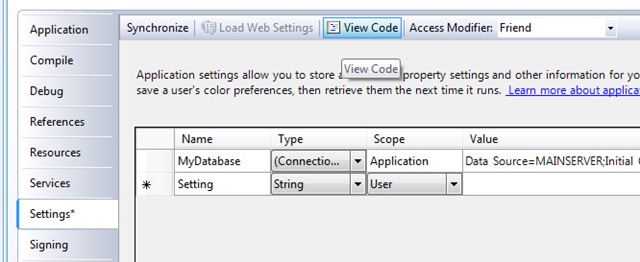
To modify simply open the project properties, and switch to the the settings window and click on the “View Code” button.

This will add a partial class for “MySettings” to your project. From which it is easy to override any settings.

To override a particular property or group of properties is easy by overriding the “Item” property: –

Partial Friend NotInheritable Class MySettings
    Default Public Overloads Overrides Property Item(ByVal propertyName As String) As Object
       
Get
            If
propertyName = “MyDatabase”
Then
                Return
Connection.GetConnectionString

           
Else
                Return
MyBase.Item(propertyName)
           
End If
        End Get
        Set
(ByVal value As Object)
            If propertyName = “MyDatabase” Then
               
Connection.SetConnectionString(value)

           
Else
                MyBase.Item(propertyName) = value

            End If

        End Set
    End Property
End Class

Where “Connection” is a custom class build to use shared legacy application connection settings.

Paul B
MCP

T-SQL Foreign Key ON DELETE CASCADE and ON DELETE SET NULL – Creating an alternative INSTEAD OF DELETE TRIGGER that allows multiple cascading paths…

… to avoid “Error message 1785 occurs when you create a FOREIGN KEY constraint that may cause multiple cascade paths”
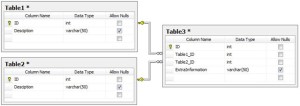
In most cases if you need to support linking of more than one ID from one table into another table, you would use an intermediary table, this allows any number of links to be established and details of each link can be supplemented with additional details.
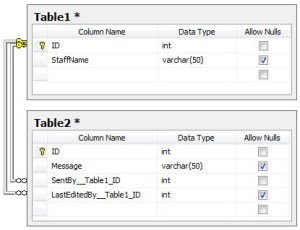
However when maintaining and upgrading an existing database that has been around for many years, or even designing a new one, were there will only ever be a need to link in a specific number of IDs, it may be the case that the IDs are placed within the other table directly. 

Doing this prevents the ability for SQL to use the ON DELETE CASCADE and ON DELETE SET NULL from working.
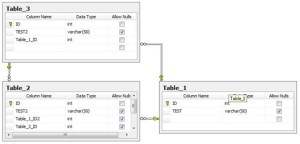
Indeed even if there is only the one ID linked in, but there is more than one round table link you cannot have multiple ON DELETE CASCADE foreign keys established between the tables because it will also fail. Both these examples give the error “Error message 1785 occurs when you create a FOREIGN KEY constraint that may cause multiple cascade paths”.

I recently embarked on upgrading an existing database to include foreign keys relationships (previously controlled by software only), so that we could introduce full support for merge replication.

The database includes over 360 tables with around 860 relationships to be establish between tables, it is used by over 4500 users in a large number of organisations, with around 70 modules (or applications) accessing the data.

As the applications have been designed and written over the past 10 years by several developers there is no way to guarantee that all the relationships between tables are being enforced correctly… Leaving aside the creation of the FKs and the verification of existing data for another blog, I needed a way to maintain compatibility with all the applications currently using the database. The only way to do this while properly enforcing the foreign keys would be to delete or set to NULL the appropriate linked data on deletion of a row, rather than rely on the application to perform the action.

Having searched for quite a while I found that there was many examples of people recommending using an INSTEAD OF DELETE TRIGGER, to accomplish it, though I could not find any examples. After searching for some time the only examples I found contain hard coded references to linked tables. This is no way ideal and would be a nightmare to maintain with over 860 foreign key links between over 360 tables, which are added to and modified on a regular basis as the applications continue to grow.

Anyway to cut a long story short and get to the code I wrote a TRIGGER that would satisfy my needs, based on a few assumptions.

  1. If a Foreign Key column is nullable I am assuming it is not dependant on the Primary Key data and should be set to NULL rather than deleted.
  2. If the Foreign Key does not support NULLs then the data must be dependant on a valid link and will be deleted… obviously in this case I am assuming that all of the FKs that do not support NULLs are not to be set to a default value from the PK table.
  3. Within the TRIGGER I am will be checking if the FK constraint has a referential action, is disable, is trusted (enforced) and also isn’t a link back to the PK table itself.
  4. The Trigger is designed to fail if fired against a table that has a multi-column Primary Key.

It is worth noting when using a trigger it can be run on multiple rows and is not run for each row deleted, so must handle this

Now I am a bit short of time tonight so I am just going to just show the source of what I have done and assume you will be able to interpret it….

The trigger will cycle through all Foreign keys based on the tables name and the primary key column name. It then deletes or updates the dependant data as appropriate, as it does so (assuming the same trigger is on the dependant tables) if the dependant tables have an update or delete trigger on them it will in turn trigger that causing a cascade effect… As a result of this it could potentially result in a long loop so needs to be used with caution and the database’s foreign keys need to be established carefully.

You should not use this trigger if you are unsure, and I bear no responsibility for any data that is lost as a result of it’s usage! The trigger is based on T-SQL for MS SQL Server 2005, INSTEAD OF DELETE does not work in MS SQL 2000 and I have not tested it on MS SQL 2008.

The trigger looks something like the following; it is based on a table called [Table_1] with a Primary Key column that is either an integer or varchar called [ID], I will be adding it to all tables I’ll be writing a script that just runs through all the tables adding it: –

Code revised 31st Jan. 2009


IF  EXISTS (SELECT * FROM sys.triggers WHERE object_id = OBJECT_ID(N'[dbo].[TRIG_PK_Table_1_Delete_FKs]’))

DROP TRIGGER [dbo].[TRIG_PK_Table_1_Delete_FKs]

GO


/**

CODED BY: Paul Bunting (http://www.paulbunting.com/)

Created: 23/01/2009

Modified: 31/01/2009

**/
CREATE TRIGGER TRIG_PK_Table_1_Delete_FKs ON dbo.Table_1

INSTEAD OF DELETE

AS

BEGIN

    SET NOCOUNT ON

      PRINT ‘***************************************************’

      PRINT ‘RUNNING – TRIG_PK_Table_1_Delete_FKs’
 
      — before doing anything lets check we
      — actually have something to delete!
      DECLARE @Counter_DELETED_ROWS INT
      SELECT @Counter_DELETED_ROWS = COUNT([EQUIPMENTID]) FROM DELETED

      IF (@Counter_DELETED_ROWS <= 0)
      BEGIN
          PRINT ”
          PRINT ‘0 records deleted’
          PRINT ”
      END
      ELSE
      BEGIN   

    — 1) we only wish to deal with tables that have one Primary Key…

    —    so lets check that this table has only one Primary Key

    DECLARE @Counter_PKs INT

    SELECT @Counter_PKs = COUNT(Col.Column_Name) FROM
            INFORMATION_SCHEMA.CONSTRAINT_COLUMN_USAGE Col

            INNER JOIN INFORMATION_SCHEMA.TABLE_CONSTRAINTS Tab

            ON  Col.Constraint_Name = Tab.Constraint_Name AND
            Col.Table_Name = Tab.Table_Name

      WHERE Tab.Constraint_Type = ‘PRIMARY KEY’ AND
            Col.Table_Name = ‘Table_1’


      — 2) Verify only 1 found

      PRINT ‘  Found ‘ + CONVERT(VARCHAR(255), @Counter_PKs) +
            ‘ primary keys in table’

      IF (NOT (@Counter_PKs = 1))

      BEGIN

            — Lets throw an error if this trigger has been established 

            — against a table with more than one Primary Key, could

            — alter this later to handle them but no requirement to

            — do so at the moment

            DECLARE @tn varchar(4000)

            SELECT @tn = object_name(parent_obj)
            FROM sysobjects WHERE id = @@procid

            SET @tn = ‘Casscade deletes not allowed for this ‘ +
                   ‘table due to multiple primary key columns: ‘ + @tn

            PRINT @tn

            IF EXISTS(SELECT TOP(1) * from deleted) 

                  RAISERROR (@tn, 16, 1)   

      END

      ELSE

      BEGIN

            — 3) Lets get all the Foreign Keys assosiated with this table

            DECLARE @ForeignKeys TABLE (TableTempID bigint
               IDENTITY(1,1) PRIMARY KEY CLUSTERED,

               [Name] varchar(2000),[OBJECT_ID] int, [is_disabled] bit,
               [is_not_for_replication] bit,
               [delete_referential_action] int,
               [update_referential_action] int,
               [Fk_table_name] varchar(2000),
               [Fk_table_schema] varchar(2000),
               [Pk_table_name] varchar(2000),
               [Pk_table_schema] varchar(2000),
               [Fk_col_name] varchar(2000),
               [Pk_col_name] varchar(2000),
               [constraint_column_id] int,
               [is_not_trusted] bit)


            INSERT INTO @ForeignKeys
               ( [Name], [OBJECT_ID], [is_disabled],
                 [is_not_for_replication], [delete_referential_action],

                 [update_referential_action], [Fk_table_name],
                 [Fk_table_schema], [Pk_table_name], [Pk_table_schema],

                 [Fk_col_name], [Pk_col_name], [constraint_column_id],
                 [is_not_trusted] )

               ( select Fk.name, Fk.object_id, Fk.is_disabled, 
                  Fk.is_not_for_replication, Fk.delete_referential_action,

                  Fk.update_referential_action,
                  object_name(Fk.parent_object_id) as Fk_table_name,

                  schema_name(Fk.schema_id) as Fk_table_schema,
                  TbR.name as Pk_table_name,
                  schema_name(TbR.schema_id) Pk_table_schema,

                  col_name(Fk.parent_object_id,
                  Fk_Cl.parent_column_id) as Fk_col_name,

                  col_name(Fk.referenced_object_id,
                  Fk_Cl.referenced_column_id) as Pk_col_name,
                  Fk_Cl.constraint_column_id,

                  Fk.is_not_trusted

                 from sys.foreign_keys Fk
                  left outer join sys.tables TbR

                 on TbR.object_id = Fk.referenced_object_id
                  inner join sys.foreign_key_columns Fk_Cl

                 on Fk_Cl.constraint_object_id = Fk.object_id

                 where

                  ( ([TbR].[name] = ‘Table_1’) AND
                    (col_name(Fk.referenced_object_id, 
                        Fk_Cl.referenced_column_id) = ‘ID’) AND
                    ([Fk].[delete_referential_action] = 0) AND

                    ([Fk].[is_disabled] = 0) AND
                    ([Fk].[is_not_trusted] = 0) ) )


            — 4) Lets see how many Foreign Keys we are dealing with

            DECLARE @Counter bigint

            DECLARE @MaxTableCount BIGINT


            SELECT @MaxTableCount = max(TableTempID) from @ForeignKeys

            SET @Counter = 1

            PRINT ‘  Found ‘ + CONVERT(VARCHAR(255), @MaxTableCount) +
                 ‘ foreign keys links for this table’


            DECLARE @Fk_table_name VARCHAR(2000)

            DECLARE @Pk_table_name VARCHAR(2000)

            DECLARE @Fk_col_name VARCHAR(2000)

            DECLARE @Pk_col_name VARCHAR(2000)

            DECLARE @is_not_trusted BIT

            DECLARE @is_disabled BIT

            DECLARE @delete_referential_action INT

            DECLARE @Fk_col_IsNullable BIT


            DECLARE @sqlQuery nVarchar(4000)


            — 5) Lets cycle through all the Foreign Keys

            WHILE (@Counter <= @MaxTableCount)

            BEGIN


                 SELECT @Fk_table_name = ltrim(rtrim(Fk_table_name))
                  FROM @ForeignKeys WHERE TableTempID = @Counter

                 SELECT @Pk_table_name = ltrim(rtrim(Pk_table_name))
                  FROM @ForeignKeys WHERE TableTempID = @Counter

                 SELECT @Fk_col_name = ltrim(rtrim(Fk_col_name))
                  FROM @ForeignKeys WHERE TableTempID = @Counter

                 SELECT @Pk_col_name = ltrim(rtrim(Pk_col_name))
                  FROM @ForeignKeys WHERE TableTempID = @Counter

                 SELECT @is_not_trusted = ltrim(rtrim(is_not_trusted))
                  FROM @ForeignKeys WHERE TableTempID = @Counter

                 SELECT @is_disabled = ltrim(rtrim(is_disabled))
                  FROM @ForeignKeys WHERE TableTempID = @Counter

                 SELECT @delete_referential_action =
                   ltrim(rtrim(delete_referential_action))
                  FROM @ForeignKeys WHERE TableTempID = @Counter


                 SELECT @Fk_col_IsNullable = c.IsNullable
                  FROM syscolumns c WHERE c.id =
                   OBJECT_ID(@Fk_table_name) AND
                   c.NAME = @Fk_col_name


                  PRINT ‘—————————————‘

                  PRINT ‘  Processing key ‘ +
                    CONVERT(VARCHAR(255), @Counter) + ‘ of ‘ +
                    CONVERT(VARCHAR(255), @MaxTableCount)

                  PRINT ‘  @Fk_table_name "’ + 
                    CONVERT(VARCHAR(255), @Fk_table_name) +
                    ‘" ~ @Fk_col_name – "’ +
                    CONVERT(VARCHAR(255), @Fk_col_name) + ‘"’

                  PRINT ”


                  — 6) Lets verify that there is no CASCADE or
                  —    UPDATE already on the Key link and that
                  —    it is not a system table… also

                  —    need to verify that the Foreign Key Table
                  —    is not the same as the current table and
                  —    that Key should be enforced.

                  IF (

                              (@delete_referential_action = 0) AND

                              (@is_not_trusted = 0) AND

                              (@is_disabled = 0) AND

                              (@Fk_table_name <> ‘dtproperties’) AND

                              (@Fk_table_name <> ‘sysdiagrams’) AND

                              (NOT (@Fk_table_name = @Pk_table_name))

                        )

                  BEGIN


                        — 7) Because we need to execute deletes with
                        —    a "EXECUTE sp_executesql…" statement the

                        —    DELETED table is not available so we must
                        —    cycle through it in case it is a batch
                        —    delete.

                        —

                        —    We convert the values to Varchar here to
                        —   account for PKs that are text and integer,
                        —   plus we need it as text later

                        —

                        —    This is because we do not know what all
                        —    the FK column names will be so we need

                        —    to build the query

                        DECLARE @DELETED_ROWS TABLE
                          (TableTempID bigint IDENTITY(1,1)
                            PRIMARY KEY CLUSTERED,

                           [ValueINNER] varchar(4000))


                        INSERT INTO @DELETED_ROWS

                          ( [ValueINNER] )

                          ( SELECT CONVERT(VARCHAR(4000), [ID])
                            from DELETED )

                        DECLARE @CounterINNER bigint

                        DECLARE @MaxTableCountINNER BIGINT

                        DECLARE @ValueINNER VARCHAR(4000)


                        SELECT @MaxTableCountINNER = max(TableTempID)
                          from @DELETED_ROWS

                        SET @CounterINNER = 1


                        — 8) Lets cycle through all the ROWS to be deleted

                        WHILE (@CounterINNER <= @MaxTableCountINNER)

                        BEGIN

                              SELECT @ValueINNER =
                                 ltrim(rtrim([ValueINNER])) 
                              FROM @DELETED_ROWS WHERE
                                TableTempID = @CounterINNER

                              — 9) Lets see if the Foreign Key
                              —    column allows nulls… we will
                              —    use this to guess if the linked
                              —    table is dependant on the
                              —    link (i.e. a link between

                              —    an email and it’s attachments)
                              —    or if it is only a lookup link
                              —    (i.e. a link between a staff 
                              —    member and the email they edited…
                              —    may want to delete the staff
                              —    member but don’t want their
                              —    emails deleted)

                              PRINT ‘====’

                              IF (@Fk_col_IsNullable = 1)

                              BEGIN

                                    — 10a) Set LINKED values to NULL
                                    —      (Using the like statement here
                                    —      should account for INT and
                                    —      VARCHAR PKs)

                                    PRINT ‘  UPDATE [‘ + @Fk_table_name
                                     + ‘] SET [‘ + @Fk_col_name 
                                     + ‘] = NULL WHERE [‘ + @Fk_col_name
                                     + ‘] LIKE ”’ + @ValueINNER + ””

                                    SET @sqlQuery = ‘

SET NOCOUNT OFF

UPDATE [‘ + @Fk_table_name + ‘] SET [‘ + @Fk_col_name + ‘] = NULL WHERE [‘ + @Fk_col_name + ‘] LIKE ”’ + @ValueINNER + ”’

SET NOCOUNT ON’

                                    –PRINT @sqlQuery

                                    EXECUTE sp_executesql @sqlQuery

                              END

                              ELSE

                              BEGIN

                                    — 10b) Delete DEPENDANT values
                                    —      (Using the like statement
                                    —      here should account for INT
                                    —      and VARCHAR PKs)

                                    PRINT ‘  DELETE FROM [‘
                                     + @Fk_table_name + ‘] WHERE [‘
                                     + @Fk_col_name + ‘] LIKE ”’
                                     + @ValueINNER + ””

                                    SET @sqlQuery = ‘

SET NOCOUNT OFF

DELETE FROM [‘ + @Fk_table_name + ‘] WHERE [‘ + @Fk_col_name + ‘] LIKE ”’ + @ValueINNER + ”’

SET NOCOUNT ON’

                                    –PRINT @sqlQuery

                                    EXECUTE sp_executesql @sqlQuery

                              END

                              PRINT ‘====’

                              SET @CounterINNER = @CounterINNER + 1

                        END 

                  END


                  SET @Counter = @Counter + 1

            END

            PRINT ‘—————————————‘


            — 11) Proceed with the delete…

            SET NOCOUNT OFF

            DELETE FROM [Table_1]

                  WHERE [ID] in (SELECT [ID] FROM DELETED)

            SET NOCOUNT ON

            –PRINT ‘DELETE FROM [Table_1]

            —    WHERE [ID] in (SELECT [ID] FROM DELETED)’

      END


      END 


      PRINT ‘COMPLETED – TRIG_PK_Table_1_Delete_FKs’

      PRINT ‘***************************************************’

      SET NOCOUNT OFF

END

GO

1972 MGB GT – Part 3 – Fresh Air Vent, Cabin Heater & Pipes, Water Jets, a Wiring problem found and Engine Test Run.

Before starting work proper, on my project car, I wanted to test run the car for a bit to check the engine out after replacing most of the ignition system.

Being winter, in Scotland, I wanted to check out a few things before I did this…

First the water jets did not work; on the heavily salted roads and driving into Glasgow, I would want them working. In addition the fresh air vent that is hidden behind the centre console was jammed open and there was no heat from the cabin heater to demist the windscreen.

During the journey, bring the car back from Heathrow, it was obvious from the smell that a connection in the manual water jets had came loose. No water would exit the jets but there was a distinct smell of screen wash from the centre console indicating that the manual pump was working, just not how it should.

I figured this would be a quick fix so one Wednesday night I removed the central air vents, which came out easy (and notably where not connected to their air pipes) and found that it was a simple disconnected connection.

From here I could also see that not only were the central vents disconnected, but the main window demist vents were also disconnected, on both ends!

Looking into the air pipes I also found the issue the jammed open fresh air vent (which can be seen in the background of the above picture, closed)… it was jammed open due to one of the windscreen demist pipes, having falling behind the leaver preventing it from closing.

While I fixed the air pipe connections I noticed a loose wire sparking off the stereo casing. Judging for the condition of the female bullet connectors condition, it looked like it was fairly old and must have been shorting there for some time!

I removed the radio that had been fitted somepoint fairly recently… it has MP3 support, a USB connector and SD Card slot. I taped up the loose connection with some insulating tape and will have to investigate further where exactly it should be connected to when I dismantle that area during the rebuild process.

While re-inserting the radio, due to the mess of the wiring behind it I inadvertently disconnected clock and cigarette lighter.

Once reconnected I found I was getting heat to the demist vents, and now the fan switch did not have the water jets squirting onto it, the fan worked (well most of the time, switch seems faulty)… the heater would only give heat to the windscreen and would not fully switch to the centre console vents that continued to release cold air through the driver side, though this would be more than fine for a few test drives.  

So I had water jets and de-mist ability… this would allow me to take the car for a few test runs…

The next morning I used the car for the school run taking Caelan to nursery.

This went fine, with the car starting each time first turnover, so I decided it should be fine to take into a work meeting in Glasgow on Friday. This would be a round trip journey of close to 100 miles and provides the opportunity to the use the motorway there and to use some B roads for 3/4 of the return journey.

The journey into and out of Glasgow went without a hitch! So all going well so far.

1972 MGB GT – Part 2 – Lights, Ignition System and Misfire

As mentioned in my previous post, on the journey back from Heathrow, the car had a slight misfire which was more noticeable the next day.

The MGB GT has a twin carburetor, where one carburetor feeds the first two cylinders and the other the second two. As the air filters looked quite old and the misfire sounded like it was on a couple of cylinders I thought I would check them first.

As it turned out the rubber seals around the inside of the K&N filters had completely split, partially blocking the air filters.

Before going down to pick up the car I had ordered a service kit from the MG Owners Club, as the previous owner had told me it would be due one soon. The service kit came with two standard air filters. Though they are designed to go in the standard air filter housing I briefly replaced the K&N filters with the new standard filters to see if it would make any difference. I also gave the carburetors a quick visual check and oiled the accelerator connections.

Replacing the filters did not correct the problem so I proceeded to check the ignition system.

As it turned out there was several problems, the points were corroded, the distributor cap had worn points and corroded lead connector points, the ignition leads were corroded and damaged, and the spark plugs looked like they could do with being replaced.


As the service kit I bought came with a new condenser, points and spark plugs, I fitted these first and ordered new ignition leads, distributor cap, rotor arm, ignition coil and air filters.


In addition to the misfire, when bringing  the car back up to Scotland, the window wipers had stopped working around half way back. Checking the handbook I quickly found which fuse had blown. The same fuse is used for the heater blower, which appears to be the problem.

As there was no spare fuses in the fuse box I had to repeatedly stop on the way back to clear the screen. As the fuses used in the MGB’s are no-longer available at any service stations I also order some some from the MG Owners Club (http://www.mgocspares.co.uk/).


While picking up the car the previous owner also noticed that one of the side lights had stopped working during their journey to the Airport. While checking this I also gave the car a quick check over to see if anything else was in need of immediate replacement prior to starting on the bodywork.

While checking the lights I found that the housing for the driver side headlamp was severely corroded, and some of the wires (namely the side light ones), had came away from their terminal connectors.


I added the headlamp housing and rubber seal to the list of parts I needed just now.


The delivery of the spares was very prompt, allowing me to replace the parts over the next few weekends, taking a few weekends off to visit relatives over Christmas and getting the car running again last weekend.


Having replaced all but the ignition coil and distributor itself, the engine appears to be running smoothly now, though I have only ran it for 5 to 10 miles so far, I intend run it a bit more before starting to strip out more major parts for inspection, and possible replacement.


Some of the things that are on my list to tackle next include: –

  • One of the jack points needs re-welded (will also get a mechanic to check and see if any other welding is required)
  • Some areas need to be retreated with under-seal
  • Driver side sill, to the rear, needs repaired
  • The major job… the various areas of bodywork that need attention and a re-spray
  • General engine bay tidy up (some water trap areas need touching up and repairing)
  • Source problem with de-mist pipes and manual water jets
  • Locate where cold air is entering the foot-well (cool air vent was shut)
  • Look into the heater and all associated piping (air and water), see what needs replaced and what is OK
  • Fitting electric water jets (still fitted with the old manual jets)
  • Window seals (front quarter windows in particular) need attention
  • Oil change and replace oil filter
  • Check header gasket and possibly replace
  • Re-oil SU carburetors
  • Replace timing belt (as I have no idea when it was last done) 

              … no doubt more will be added to the list as the project unfolds …

For it’s age and the money I parted with, I am quite pleased with the condition of the car so far… particularly given the previous owner had told me that the owner, prior to them, had left it sitting outdoors unused for many years (to the point it was moss covered), before they rescued it. They gave it a little clean up and continued using it for a couple of years as a general run around until they had to sell to it to make way for a VW Camper they were purchasing.