One for the gamers out there… or the nostalgic…

This week a first look at the new design from the Ataribox project.
You can sign up to get updates at www.ataribox.com …

One for the gamers out there… or the nostalgic…
This week a first look at the new design from the Ataribox project.
You can sign up to get updates at www.ataribox.com …
You can grab the latest Visual Studio 2017 update now (version 15.2) and view the release notes at https://www.visualstudio.com/en-gb/news/releasenotes/vs2017-relnotes#15.1.26430.16 which was released on 17th July 2017.

 New update for Azure SQL Data Warehouse…
Reduce troubleshooting time with the upgraded Resource Health check for SQL Data Warehouse.
This upgrade considers the health status of all components of the SQL Data Warehouse architecture, which includes each SQL database distribution and the SQL Data Warehouse engine on each compute node. Login and heartbeat signals of each component are emitted at least once every 2 minutes, providing you a low-latency, holistic view of the health status of your data warehouse. If your instance is Unavailable, we will provide the reason along with recommended actions that you should perform.
The Resource Health check can detect unavailability reasons, such as when your instance is pausing, scaling, or upgrading. This feature also detects when there are any connection issues, whether they are user connections or inner SQL database connections.
You check the health of SQL Data Warehouse by signing in to the Azure portal and clicking the Resource Health blade.
 A free course and introduction to deep learning through the applied task of building a self-driving car. Taught by Lex Fridman.
Visit http://selfdrivingcars.mit.edu/ for full details of “MIT 6.S094: Deep Learning for Self-Driving Cars“.
Azure Cosmos DB is a globally distributed system that supports the document, graph, and key-value data models which Microsoft have classified as a multi-model database service for mission-critical systems.
It also supports both the API for MongoDB and the DocumentDB API for creating, querying, and managing resources.
If you would like to understand how to answer any of the following questions: –
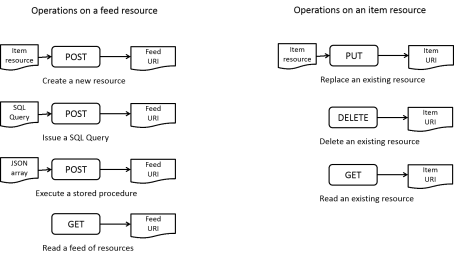
Interaction model using the standard HTTP methods
Then take a look at Azure Cosmos DB REST API for full details first published on 18th July 2017 which covers these topics.
If interested in performing CRUD operations using REST, see Common tasks using the Azure Cosmos DB REST API.
If interested in performing CRUD operations using C# and REST, see the REST from .NET Sample on GitHub which can help you out.
If interested in more details of the MongoDB API, then see Introduction to Azure Cosmos DB: API for MongoDB which covers the benefits of using Azure Cosmos DB for MongoDB applications.
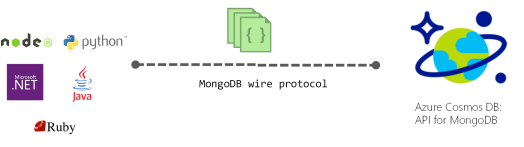
MongoDB wire protocol
… and finally if looking for help getting started then the following MongoDB quick starts will help you out: –
and also: –
Re-post from http://machinelearningexp.com/data-science-performance-of-python-vs-pandas-vs-numpy/
Speed and time is a key factor for any Data Scientist. In business, you do not usually work with toy datasets having thousands of samples. It is more likely that your datasets will contain millions or hundreds of millions samples. Customer orders, web logs, billing events, stock prices – datasets now are huge.
I assume you do not want to spend hours or days, waiting for your data processing to complete. The biggest dataset I worked with so far contained over 30 million of records. When I run my data processing script the first time for this dataset, estimated time to complete was around 4 days! I do not have very powerful machine (Macbook Air with i5 and 4 GB of RAM), but the most I could accept was running the script over one night, not multiple days.
Thanks to some clever tricks, I was able to decrease this running time to a few hours. This post will explain the first step to achieve good data processing performance – choosing right library/framework for your dataset.
The graph below shows result of my experiment (details below), calculated as processing speed measured against processing speed of pure Python.
As you can see, Numpy performance is several times bigger than Pandas performance. I personally love Pandas for simplifying many tedious data science tasks, and I use it wherever I can. But if the expected processing time spans for more than many hours, then, with regret, I change Pandas to Numpy.
I am very aware that the actual performance may vary significantly, depending on a task and type of processing. So please, treat these result as indicative only. There is no single test that can shown “overall” comparison of performance for any set of software tools.
…
Posted on July 15, 2017 by
see full post @ http://machinelearningexp.com/data-science-performance-of-python-vs-pandas-vs-numpy/
–
Re-post from http://opensourceforu.com/2017/07/amazon-brings-net-core-support-aws-cloud/
Encouraging developers to massively build cross-platform applications, Amazon has added .Net Core support to its AWS Cloud services. The series that has been upgraded with the new support includes the AWS CodeStar and AWS CloudBuild services.
“The support for .Net Core in AWS CodeStar and AWS CodeBuild opens the door for .Net developers to take advantage of the benefits of Continuous Integration and Delivery when building .Net based solutions on AWS,” said Tara Walker, technical evangelist, Amazon Web Services (AWS), in a statement.
The AWS team launched the CodeStar service back in April for Amazon EC2, AWS Elastic Beanstalk and AWS Lambda projects using five programming languages, including JavaScript, Java, Python, Ruby and PHP. Though the original list of supported languages was covering a large part, Amazon has now planned to target developers on Microsoft’s Azure by enabling .Net Core support.
Deploy code on Amazon EC2 and AWS Lambda
Developers can leverage the latest support to build and deploy their .Net Core application code to both Amazon EC2 and AWS Lambda. This ability comes through the CodeBuild service that brings two new project templates to AWS CodeStar for .Net Core applications. Also, there is sample code and a full software development toolchain to ease the development.
Importantly, the presence of Visual Studio 2017 is required alongside the AWS Toolkit for Visual Studio 2017 to start building .Net Core applications for Amazon’s cloud solution. You can also deploy your existing .Net Core code enable your applications on AWS.
by Jagmeet Singh on July 13, 2017
–

Re-post from http://angularjs.blogspot.co.uk/2017/07/angular-43-now-available.html
Angular version 4.3 has been released. This is a minor release following our announced adoption of Semantic Versioning, meaning that it contains no breaking changes and that it is a drop-in replacement for 4.x.x.
What’s new?
- We are introducing HttpClient, a smaller, easier to use, and more powerful library for making HTTP Requests. Learn more about it from our docs
- New router life cycle events for Guards and Resolvers. Four new events: GuardsCheckStart, GuardsCheckEnd, ResolveStart, ResolveEnd join the existing set of life cycle event such as NavigationStart
- Conditionally disable animations via a new attribute, [@.disabled]
- Support for the emulated /deep/ CSS Selector (the Shadow-Piercing descendant combinator aka >>>) has been deprecated to match browser implementations and Chrome’s intent to remove. ::ng-deep has been added to provide a temporary workaround for developers currently using this feature.
For the complete list of features and bugfixes please see the changelog.
Kirill Gavrylyuk stops by Azure Friday to talk Cosmos DB with Scott Hanselman.
Watch this quick overview of the industry’s first globally distributed multi-model database service followed by a demo of moving an existing MongoDB app to Cosmos DB with a single config change.
For more information, see: https://azure.microsoft.com/en-us/services/cosmos-db/

Azure Cosmos DB is a globally distributed multi-model database with support for multiple APIs. This is a link to an article which describes how to use REST to query resources using the Azure Cosmos DB API – https://docs.microsoft.com/en-us/rest/api/documentdb/querying-documentdb-resources-using-the-rest-api
All Cosmos DB resources (with the exception of account resources) can be queried using Azure Cosmos DB SQL language. See Query with Azure Cosmos DB SQL for additional details on syntax – http://azure.microsoft.com/documentation/articles/documentdb-sql-query
For a full sample using .NET visit https://github.com/Azure/azure-documentdb-dotnet/tree/master/samples/rest-from-.net

 Paul Bunting • Architecture Team Manager and Senior IT Architect